Skip to content

One system for billing, stock and sales, with AI agents that wait for your OK

Replace spreadsheets and several separate apps with an ERP set up around how your business runs. You get a fixed quote after a free call.

  • No per-user licence fees
  • Delivered by our engineering team in India
  • Discovery to support in five steps
  • AI agents, approved by a person

What the AI does in your ERP

AI agents prepare the routine work in your ERP and wait for your OK. Fixed quote after a free call

  • Purchase orders on low stock

    When an item falls below its reorder level, the agent drafts a purchase order for you to review

  • Invoices matched to POs

    Supplier invoices are matched to purchase orders, and the ones that do not agree are flagged

  • Overdue payment follow-up

    The agent drafts a reminder for each overdue invoice and waits for approval before it goes out

  • Updates from your inbox

    When a customer or supplier emails a change, the assistant prepares the update for you to approve

  • Daily owner summary

    A daily summary prepared for the owner: sales, low stock and overdue payments

  • Questions in plain words

    Staff ask a question and get an answer from records they can already open. Nothing is changed

A person approves every action

Agents prepare the work. Nothing is posted to your records, or sent to a customer or supplier, until someone on your team approves it.

The limits, in writing

  • What it can do

    • Answer questions in plain words from records the asker can already open
    • Find information and run your usual reports
    • Prepare drafts for a person to review: a purchase order, a payment reminder, a record update
  • What it never does

    • Change anything in your system, approve anything, or send an email or message on its own
    • Browse the web
    • A person does all of those through the normal screens
  • Your data stays safe

    • It only sees what that staff member is allowed to see
    • It never sees your passwords
    • Bank, ID and salary details stay hidden unless the owner allows it
    • Every question is logged

The AI receptionist answers your calls and these agents prepare your paperwork. See how the two work together.

AI automation for small business

What is in the system

Pick only the parts you need. Your quote covers exactly those

  • Billing and accounting sync

    Create invoices, record payments and keep your books in step

    Invoices and payments; can integrate with QuickBooks or Xero

  • Inventory

    Know what you have and where it is

    Stock across several locations, with low-stock alerts

  • Sales and customers

    Follow every lead from first enquiry to order

    Leads, quotes and follow-ups

  • HR and payroll

    Staff records without the spreadsheet

    Attendance, leave and salary

  • Purchase

    Order from suppliers with an approval step

    Purchase orders, vendors and approvals

  • Owner dashboard

    Key sales, stock and billing figures on one screen, readable on a phone

    Updates itself from your sales, stock and billing

Who it fits

Businesses that run on orders, stock, purchasing and invoices

  • Distribution

    Orders, stock across locations and supplier purchasing in one place

  • Manufacturing

    Materials, purchasing and sales orders in one connected system

  • Construction

    Purchasing, supplier approvals and invoicing across your jobs

  • Field services

    Leads, quotes, invoices and staff attendance for teams on the road

How it works

Five steps, from the first look at your processes to support after launch

  1. 01

    Discovery

    We map how you work today: orders, stock, billing and who needs to see what

  2. 02

    Try it first

    You test your own processes in a trial version before we build the rest

  3. 03

    Build

    We set it up the way you work, connect your other tools (like QuickBooks) and bring over your customer, product and stock lists

  4. 04

    Training

    We train your team on the system, using your own workflows

  5. 05

    Support

    After launch you have a support contact. Terms are set out in your quote.

How we build

What you can expect. What applies to your project is set out in your fixed quote

  1. 01

    A written plan first

    You approve a written plan of what we will build before we start

  2. 02

    Proven software, no per-user licence fees

    Built on proven software. Add staff without paying more each month, and your system keeps getting updates

  3. 03

    Easy for your team

    Simple screens that work on a phone, tablet or office computer

  4. 04

    Everyone sees only their own work

    Sales sees sales, the warehouse sees stock, and two people can't sell the same item twice

  5. 05

    Tested before your team touches it

    We run your real business cycle (order, stock, invoice, payment) end to end before launch

  6. 06

    Looked after once you launch

    Backed up every night, monitored for problems, and fixed quickly if something goes wrong

Technical details for your IT team: ask us for the spec sheet.

Systems we've built: see them on a call

We will walk you through either one with demo data on your free call

Car rental · Ohio

All In 1 Rentals

A booking website for customers and a management app for the owner, with an assistant that helps with daily tasks.

  • Customer booking: dates, vehicle, extras and review, with online agreement signing and rental extensions
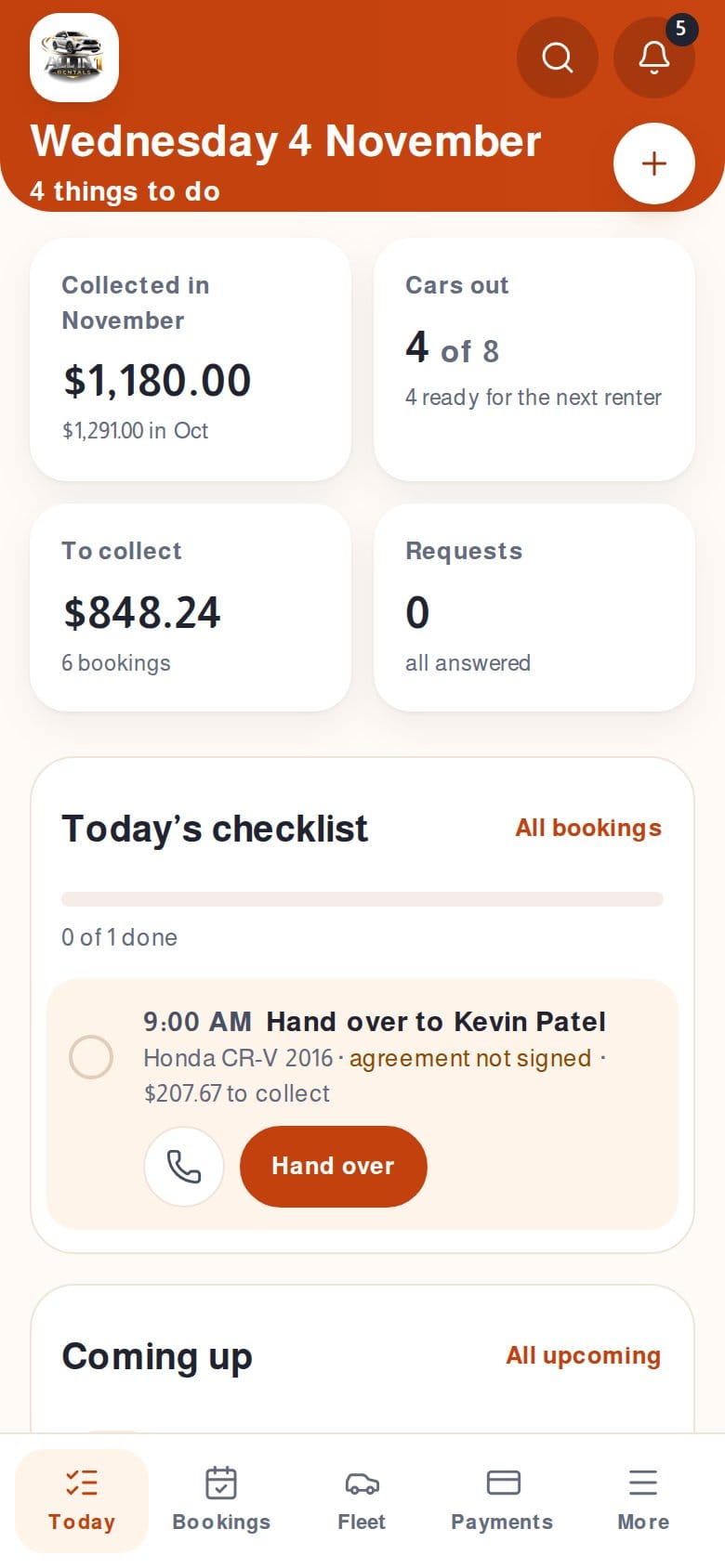
  • Admin app with Today, Bookings, Fleet, Customers, Payments, Reports, Settings and Legal and terms, on desktop and phone
  • Prices, tax and totals are worked out automatically. Cash at pickup, no deposit, Ohio state and county tax built in
  • AI assistant: daily briefing, next best action, message drafts, listing writer and ask your data. Every output ends in a button a person clicks, customer emails are never sent automatically, and the AI never sees customer emails, phone numbers or licence numbers
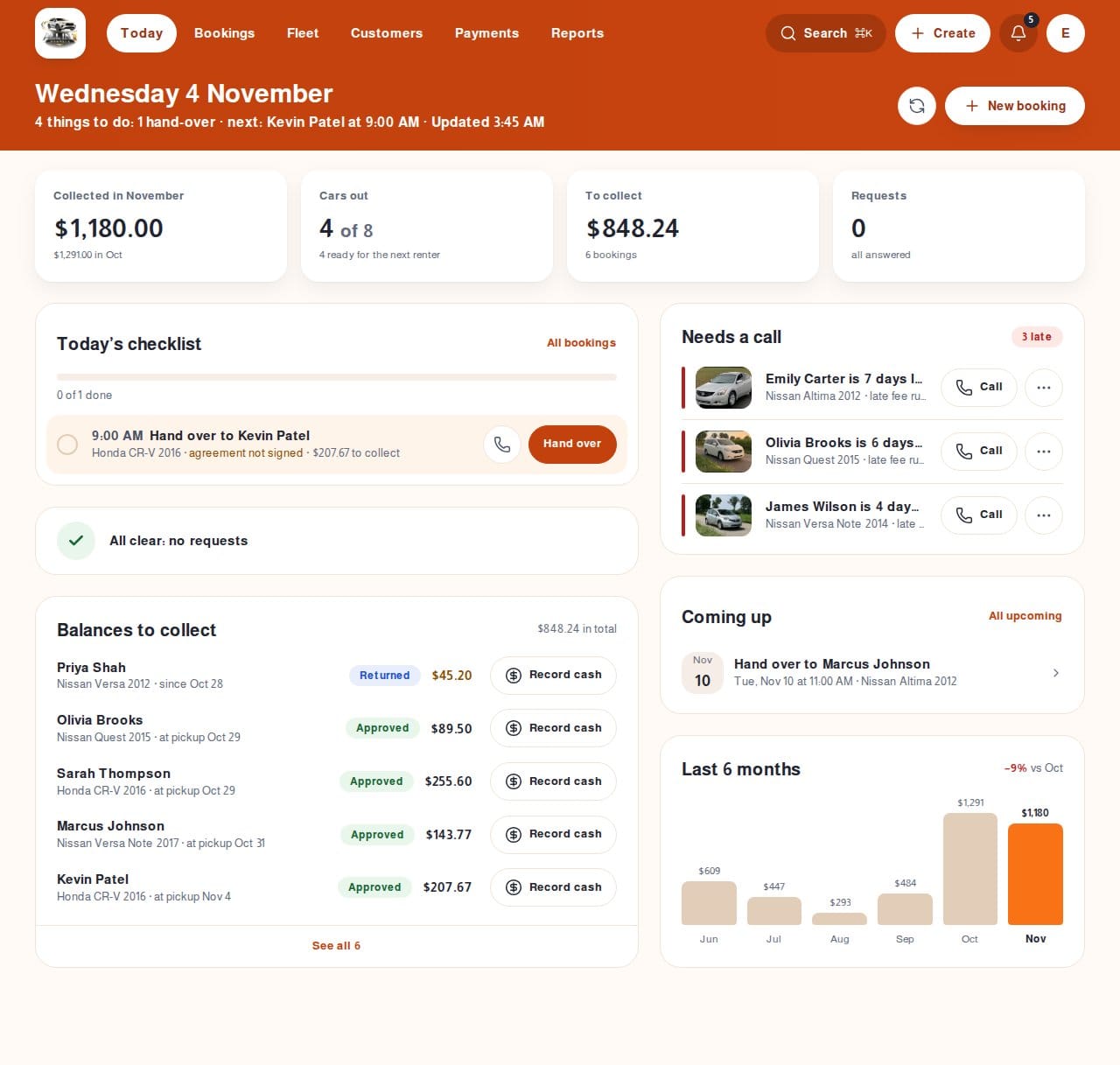
Admin Today screen of the rental app: cars out, balances to collect and late returns that need a call
Admin Today screen
The rental admin app on a phone with a bottom tab bar
Admin on a phone
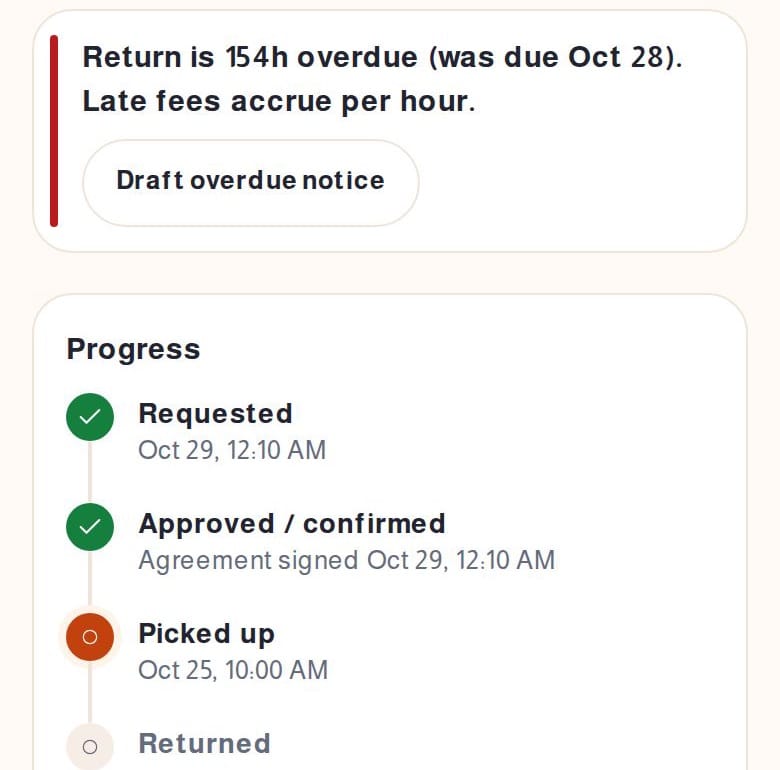
A late booking with the overdue flag and a Draft overdue notice button
Suggested next step

Hospitality · India

Resort operations ERP

A custom ERP for a resort, from front desk and rooms to restaurant, store and accounts.

  • Front desk, bookings, housekeeping, maintenance, restaurant and kitchen, store, events, accounts, HR and reports
  • Staff use it on their phone, tablet or office computer
  • Front desk, kitchen, housekeeping and managers each see only their own work
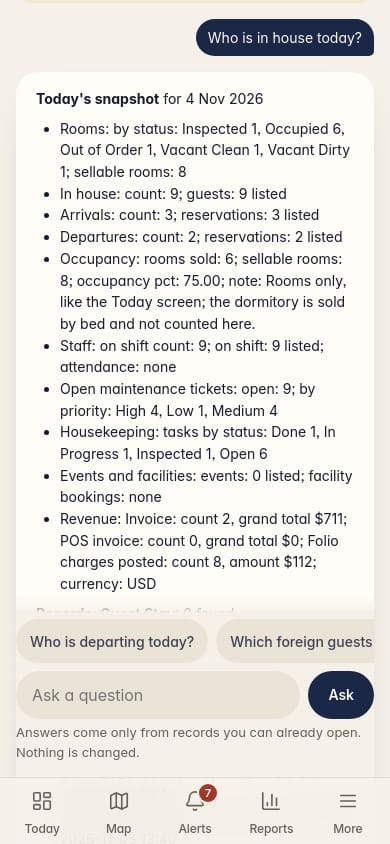
  • Staff can ask questions like “who is checking in today?”, shown with sample answers in the demo. The assistant cannot change anything
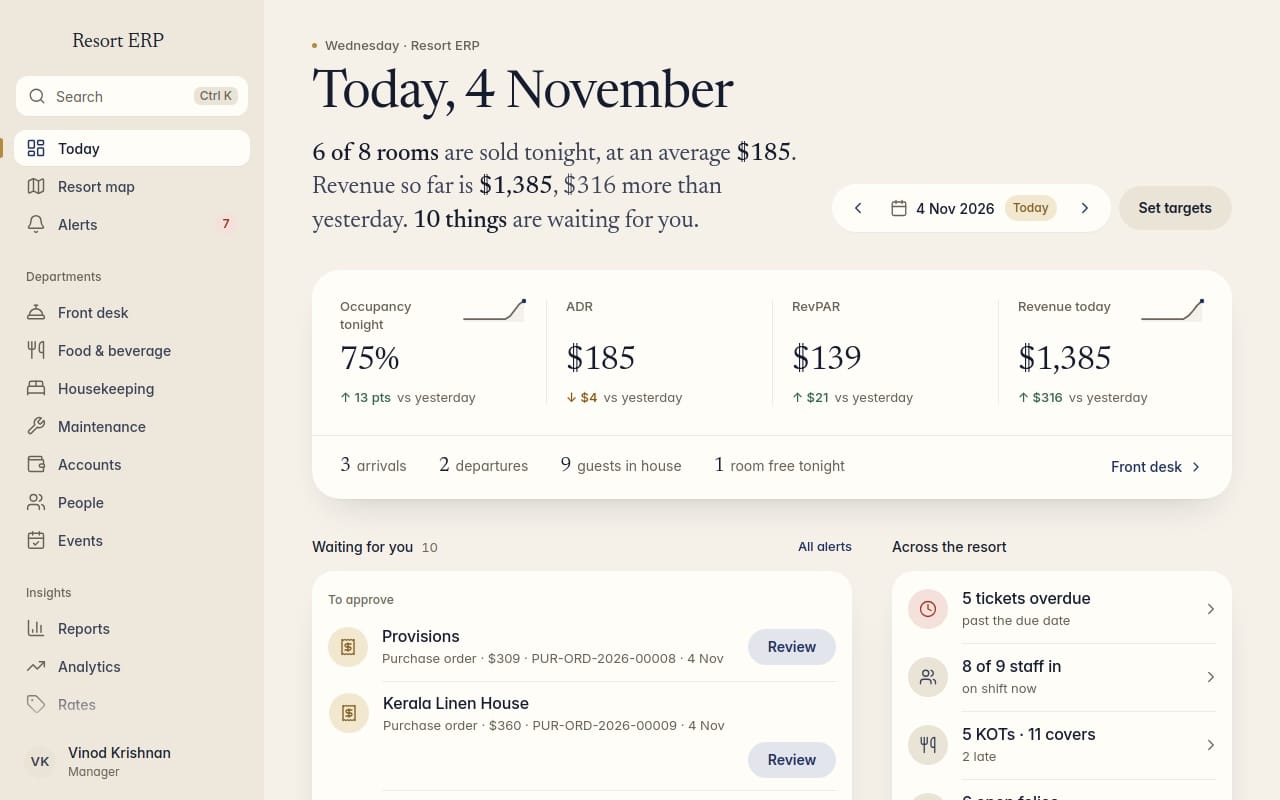
Manager's Today screen of the resort ERP showing occupancy, average daily rate, revenue and approvals waiting
Manager's Today screen
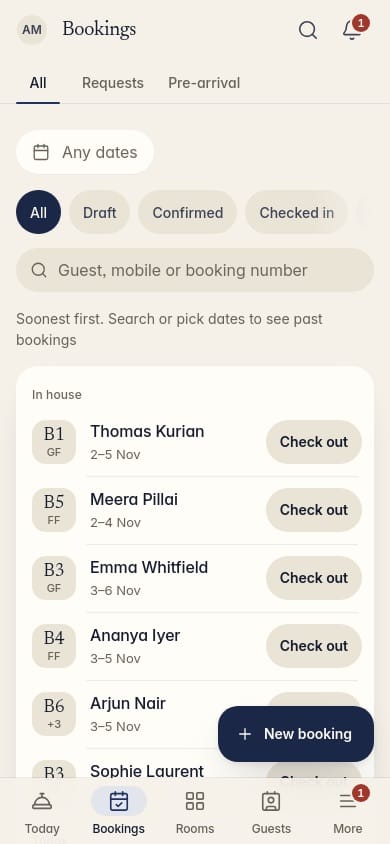
Bookings list on a phone, with a check-out button on each row
Bookings on a phone
The resort assistant answering who is in house today, on a phone
Ask the assistant (demo)

Screens show sample data.

Works with your other tools

Works with tools you already use. We confirm yours on the free call

  • QuickBooks
  • Xero
  • Shopify
  • Stripe

How we deliver

Said plainly, so there are no surprises.

  1. 01

    US front office

    Your contact is based in Dayton, OH. You talk to us, in US time, about scope, price and progress.

  2. 02

    Engineering team in India

    The build is done by our engineering team in India, under a signed confidentiality agreement.

  3. 03

    Overlap with your day

    The two teams overlap 8am–3pm Eastern, so questions get answered the same day.

ERP questions

How much does an ERP cost?

Every ERP is scoped to your processes, so you get a fixed quote after a free call. We do not publish a price list because the parts you need change the work.

How long does it take?

It depends on the parts you need and how much data comes across. You get a timeline in the fixed quote.

Which software do you use?

We build on ERPNext, a widely used open-source business system, so you pay no per-user licence fees. Our team sets it up for your business.

Can it connect to QuickBooks, Xero, Shopify or Stripe?

It can integrate with them. We confirm what is possible for your setup on the free call and put it in the quote.

What happens after launch?

Support is the last step of the process. Our US front office is your contact, and what support covers is written into your quote.

What do the AI agents do?

They prepare routine work in your ERP: draft purchase orders when stock is low, match invoices to purchase orders, draft reminders for overdue payments, prepare updates from your inbox and write a daily summary for the owner. A person approves each action before it posts. Fixed quote after a free call.

Can the AI change my records on its own?

No. Every action waits for a person on your team to approve it before it posts.

Have you built this before?

Yes. We've built a full operations system for a resort and a booking and management system for a car rental company in Ohio. We'll show you both on a call.

Get a fixed quote for your ERP

Send a few details. We reply the same business day to book a free call, then send a fixed quote.

Read our Privacy Policy

Or book a free call

Times are shown in your time zone.

Pick a day